OpenDSP
A headless-first real-time operating system for low-latency audio and video digital signal processing on embedded devices like the Raspberry Pi, or repurposed x86 PCs.
Imagine: A dedicated hardware box running your favorite synths, effects, DJ setup, or custom video processing rig. No mouse, no keyboard, no monitor needed. Controlled entirely via MIDI or OSC.
Inspired by dedicated hardware like the Muse Receptor, but completely free, open-source, and affordable to build, OpenDSP transforms your old PC or Raspberry Pi into a standalone DSP powerhouse.
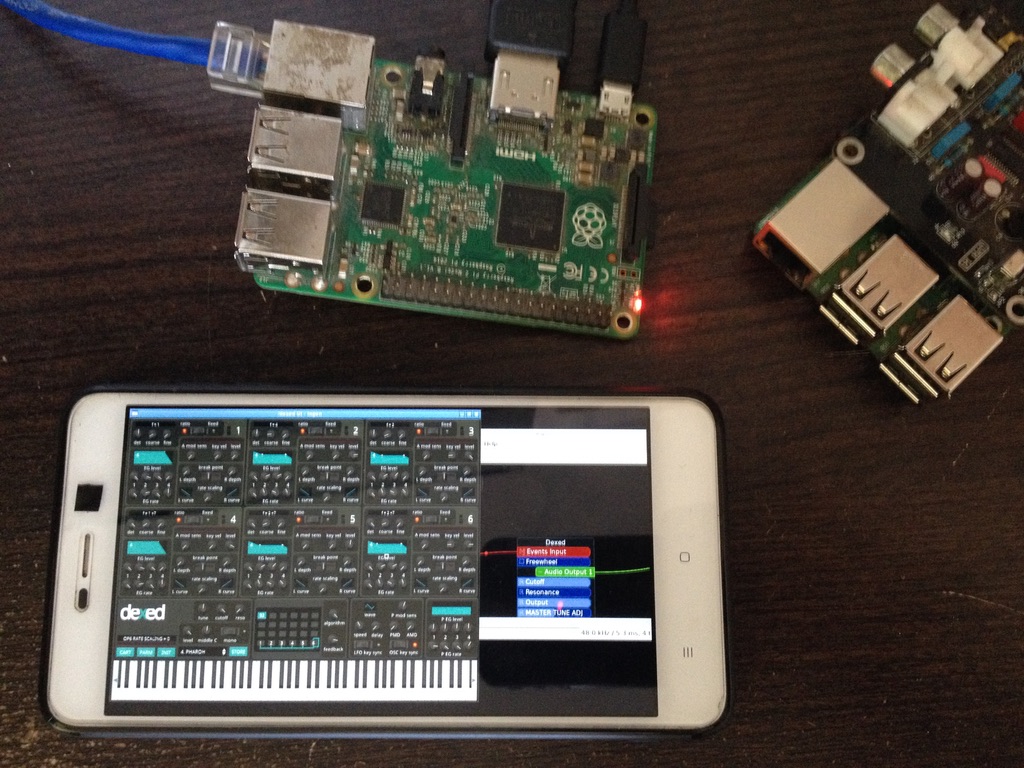
Key Features
- Headless operation — control entirely via MIDI and OSC, no screen/keyboard/mouse needed
- Optimized low-latency kernel — CPU power goes to audio/video, not background bloat
- Deeply customizable — create custom processing environments ("mods") with simple text configs
- Read-only root filesystem — safely power off by unplugging, no corruption
- Network file access — Samba share (
\\OPENDSP) for samples, presets, configs from any OS - Optional GUI — access a virtual desktop via web browser (
http://opendsp) or VNC - Built-in WiFi hotspot — plug in a USB dongle, access point "OpenDSP" appears automatically
- Dedicated video output — HDMI/DVI free for projection, manage system without disrupting visuals
Download
| Platform | Link |
|---|---|
| Raspberry Pi 2/3 | opendsp_0.11.0-raspberry_pi2_3.zip |
| LiveOS (Intel/x86-64) | GitHub Releases |
Latest version: 0.11 — see Changelog
Installation
Extract
unzip opendsp_0.11.0-raspberry_pi2_3.zip
This produces a .img file.
Write to SD Card
Windows: Etcher or Win32DiskImager
macOS: Etcher or Apple Pi Baker
Linux:
sudo dd bs=1M if=opendsp_0.11.0-raspberry_pi2_3.img of=/dev/sdX status=progress
Replace /dev/sdX with your SD card device.
OpenDSP is built on Arch Linux — the SD card partition is EXT4 (not visible on Windows). The card appears smaller than its full capacity. All data is accessible over the network.
First Boot & Configuration
Connect via SSH, VNC, or native display.
Resize User Data Partition
The user data partition is 256 MB by default. Resize it to fill your SD card:
sudo resizesd
Follow the prompts and reboot.
Change Default Password
All services (VNC, SSH, Samba) share the same password:
sudo changepassword
Default credentials: username opendsp, password opendspd.
Understanding MODs
MODs are the core unit of DSP in OpenDSP — pre-defined configurations that launch and interconnect multiple applications to act as a single, cohesive system.
- A MOD defines how apps start, connect (audio, MIDI, OSC), and respond to control signals
- Load different MODs, manage projects, and save sessions — all via MIDI or OSC
- Creating your own MOD requires only a few lines of text configuration
Example MODs
| MOD | Description |
|---|---|
modular-ingen | Generic modular environment — virtual eurorack |
dsp-processing | Interactive visuals using Processing |
daw-qtractor | Professional mixing and mastering |
tracker-sunvox | Power tracker for composing and live electronic music |
djing-mixxx | Professional DJ mixing |
looper-luppp | Real-time 8-track performance audio looper |
audio-vlc | MIDI/OSC automated audio player |
MOD Configuration Format
A MOD is defined by a simple INI file:
[app1]
name: sunvox-lofi
path: /projects/sunvox/
project: Transient - Can It Be Beautiful.sunvox
display: virtual
midi_input: "opendsp:1"
audio_output: "opendsp:1, opendsp:2"

[app2]
name: lebiniou
path: /projects/lebiniou/
args: -x 640 -y 480
display: native
audio_input: "sunvox:1, sunvox:2"

[app3]
name: input2midi
path: /projects/input2midi/
project: inputtomidi.json
midi_output: "opendsp:1"
Copy MOD directories into /mods/ on the user data partition to make them available.
MIDI Mapping
Control OpenDSP via MIDI on Channel 16.
| Action | Message |
|---|---|
| Load MOD by value | CC 79 |
| Select MOD (knob) | CC 85 |
| Change MOD (button) | CC 86 |
| Load project by Program Change | Program Change |
| Load project by value | CC 87 |
| Select project (knob) | CC 89 |
| Change project (button) | CC 90 |
| Restart system | CC 83 |
| Force display | CC 80 (0–41: off, 42–84: native, 85–127: virtual) |
Modules use channels 1–15 for their own parameters.
OSC Mapping
Control OpenDSP via OSC on UDP port 8000.
| Action | OSC Path |
|---|---|
| Load MOD | /opendsp/mod/load [module_id] [module_bank] |
| Load project | /opendsp/project/load [project_id] [project_bank] |
| Restart system | /opendsp/system/restart |
| Force display | `/opendsp/display/force_screen ['native' |
| Manage display | `/opendsp/display/force_on ['native' |
Display Options
Native Display
HDMI/DVI output — ideal for video projection. OpenDSP boots with native display on by default. Disable in config if not needed to save CPU.
Virtual Display (VNC)
Access the full desktop remotely. Use any VNC client:
- Address:
opendsp:5900 - Web browser:
http://opendsp(noVNC integrated)
GPU Drivers
For Raspberry Pi, 3 driver options are available:
| Driver | Processing | Lebiniou | Omxplayer |
|---|---|---|---|
| Legacy (default) | Fast P2D/P3D | No acceleration | Perfect |
| Fake KMS | Slow | Smooth + OpenGL | Perfect |
| Full KMS | Texture/Shader support | Buggy | No image |
Configure via OpenDSP settings.
Audio System
OpenDSP uses Jack1 for audio routing. The Raspberry Pi onboard sound can work with low-latency tuning, but an external USB soundcard (Hifiberry, Behringer UCA202, etc.) is recommended for professional results.
Network Access
Ethernet
OpenDSP tries DHCP on boot. Falls back to 192.168.2.100/16 if no DHCP server is found.
Hostname
If your network supports DDNS, ping opendsp:
ping opendsp
Otherwise, check the IP on the top bar of the native display.
SSH
ssh opendsp@opendsp
VNC
WiFi Hotspot
Plug in a compatible USB WiFi dongle — OpenDSP automatically creates an access point:
- SSID:
OpenDSP - Password:
opendspd
Samba File Share
Access the user data partition over the network:
- Windows:
\\OPENDSPin File Explorer - macOS: Finder → Go → Connect to Server →
smb://opendsp - Linux:
smb://opendspin file manager
User Data
All user data is stored on a separate partition at /home/opendsp/data/. This includes samples, projects, synth configs, videos, and MOD directories.
SFTP Access
- Protocol: SFTP
- Address:
opendspor your OpenDSP IP - Username:
opendsp - Password:
opendspd(default) - Path:
/home/opendsp/data/
Recommended clients: WinSCP (Windows), Cyberduck (macOS).
Available Applications
OpenDSP includes a curated set of open-source DSP applications:
| Category | Applications |
|---|---|
| Loopers | giada, luppp |
| DJing | mixxx, wxax |
| DAW / Sequencer | lmms, hydrogen, qtractor, non-daw, non-mixer, non-sequencer |
| Trackers | sunvox, milkytracker, klystrack |
| Modular Synthesis | carla, carla-rack, ingen |
| Video | lebiniou, omxplayer, vlc |
| DSP Programming | puredata, processing |
| Audio Plugins | 410+ audio plugins (effects, classic synth emulations) |
Building from Source
Advanced users can build OpenDSP using Docker and the official Yocto development image:
git clone https://github.com/midilab/opendsp.git
cd opendsp
git submodule update --init --recursive

docker run --rm -it -v ./:/workdir crops/poky --workdir=/workdir
TEMPLATECONF=/workdir/meta-opendsp/conf source poky/oe-init-build-env
bitbake opendsp-base-image
Dependencies
- openembedded-core
- meta-openembedded (meta-oe, meta-python, meta-multimedia, meta-networking)
OpenDSP Daemon
All ecosystem logic is handled by opendspd, the daemon that manages MOD loading, MIDI/OSC routing, project switching, and system control. The OS distribution is a convenience layer — the real focus is the daemon.