uClock
A professional-grade BPM clock generator library for Arduino and PlatformIO, designed for musicians, artists, and engineers creating sequencers, sync boxes, and real-time musical devices. It is built to be multi-architecture, portable, and easy to use within the open-source ecosystem.
uClock delivers precise, hardware-interrupt-driven clock timing for music and media applications. Whether you're building a MIDI sequencer, modular synthesizer clock, or synchronizing multiple devices, uClock provides the rock-solid timing foundation your project needs.
The absence of real-time features necessary for creating professional-level embedded devices for music and video on open-source platforms like Arduino led to the development of uClock. By leveraging timer hardware interrupts, the library can schedule and manage real-time processing with safe shared resource access through its API.
Features
- Hardware-interrupt timing for precise BPM generation
- Flexible PPQN resolutions — from 1 to 960 pulses per quarter note
- Callback architecture — PPQN output, step, sync, start/stop/pause/continue
- External sync — slave to MIDI clock or other external sources
- Shuffle & groove — per-track swing templates (MPC60, TR-909, custom)
- Multi-track step sequencer — independent sequences with individual shuffle
- Multiple sync outputs — drive different devices at different resolutions simultaneously
- Concurrency-safe API — built-in atomic operations +
ATOMIC()macro for shared resources - Software timer mode — for unsupported boards or to avoid interrupt conflicts
Supported Platforms
| Family | Boards |
|---|---|
| AVR | ATmega168/328, ATmega16u4/32u4, ATmega2560 |
| ARM | Teensy (all versions), STM32XX, Seeed Studio XIAO M0 |
| ESP32 | All ESP32 family boards |
| RP2040 | Raspberry Pi Pico and compatible boards |
Installation
PlatformIO
Add to your platformio.ini:
[env:...]
lib_deps =
    midilab/uClock@^2.3.0
Build the project — PlatformIO installs dependencies automatically.
Arduino IDE
- Open Library Manager (Tools → Manage Libraries)
- Search for
uclock - Click Install on the latest version
Core Concepts
PPQN (Pulses Per Quarter Note)
Determines the timing resolution of your clock:
| Resolution | Typical Use |
|---|---|
| PPQN_1, 2, 4, 8, 12 | Modular synthesis sync standards |
| PPQN_24 | Standard MIDI sync (24 pulses per beat) |
| PPQN_48 | Vintage drum machines, Korg DIN Sync |
| PPQN_96 | High-resolution internal clock (default) |
| PPQN_384, 480, 960 | Ultra-high resolution for modern sequencing and DAWs |
Callback Architecture
uClock triggers your code at precise intervals through callbacks:
| Callback | Purpose |
|---|---|
setOnOutputPPQN() | Main clock pulse — drive sequencers, process MIDI |
setOnStep() | 16th note intervals — step sequencers, drum patterns |
setOnSync() | Custom sync outputs — multiple device sync, modular CV |
setOnClockStart() | Clock start event — initialize sequences, send MIDI start |
setOnClockStop() | Clock stop event — reset states, send MIDI stop |
setOnClockPause() | Clock pause event |
setOnClockContinue() | Clock continue event — resume from pause |
Quick Start
Basic 96 PPQN Clock
#include <uClock.h>

void onPPQNCallback(uint32_t tick) {
    // Called at each clock pulse (96 PPQN)
    // Drive your sequencer logic here
}

void setup() {
    uClock.setOutputPPQN(uClock.PPQN_96);
    uClock.setOnOutputPPQN(onPPQNCallback);

    uClock.setTempo(120.0);

    uClock.init();
    uClock.start();
}

void loop() {
    // Your main code here
}
MIDI Sync Box with External Sync
Send MIDI clock and sync to external gear, with the ability to slave to an external master clock.
#include <uClock.h>

#define MIDI_CLOCK 0xF8
#define MIDI_START 0xFA
#define MIDI_STOP  0xFC

void onSync24Callback(uint32_t tick) {
    Serial.write(MIDI_CLOCK);
}

void onClockStart() {
    Serial.write(MIDI_START);
}

void onClockStop() {
    Serial.write(MIDI_STOP);
}

void setup() {
    Serial.begin(31250);

    uClock.setOutputPPQN(uClock.PPQN_96);
    uClock.setInputPPQN(uClock.PPQN_24);

    uClock.setOnSync(uClock.PPQN_24, onSync24Callback);
    uClock.setOnClockStart(onClockStart);
    uClock.setOnClockStop(onClockStop);

    uClock.init();
    uClock.setClockMode(uClock.EXTERNAL_CLOCK);
}

void loop() {
    if (Serial.available() > 0) {
        uint8_t midi_byte = Serial.read();
        switch (midi_byte) {
            case MIDI_CLOCK:
                uClock.clockMe();
                break;
            case MIDI_START:
                uClock.start();
                break;
            case MIDI_STOP:
                uClock.stop();
                break;
        }
    }
}
Multiple Sync Outputs
Generate different clock resolutions simultaneously for different devices:
#include <uClock.h>

#define SYNC_OUT_PIN 8

void onSync1(uint32_t tick) {
    triggerModularPulse();
}

void onSync24(uint32_t tick) {
    Serial.write(0xF8);
}

void onSync48(uint32_t tick) {
    digitalWrite(SYNC_OUT_PIN, !digitalRead(SYNC_OUT_PIN));
}

void setup() {
    uClock.setOutputPPQN(uClock.PPQN_96);
    uClock.setOnSync(uClock.PPQN_1, onSync1);
    uClock.setOnSync(uClock.PPQN_24, onSync24);
    uClock.setOnSync(uClock.PPQN_48, onSync48);

    uClock.init();
    uClock.setTempo(126);
    uClock.start();
}

void loop() {}
Available sync resolutions: any PPQN value ≤ the configured outputPPQN.
Step Sequencer Extension
uClock includes a built-in extension for step sequencers with multi-track support and per-track shuffle.
Single Track
#include <uClock.h>

#define MAX_STEPS 16

uint8_t pattern[MAX_STEPS] = {1,0,0,0, 1,0,0,0, 1,0,0,0, 1,0,0,0};

void onStepCallback(uint32_t step) {
    if (pattern[step % MAX_STEPS])
        playNote();
}

void setup() {
    uClock.setOnStep(onStepCallback);
    uClock.init();
    uClock.setTempo(126);
    uClock.start();
}

void loop() {}
Multi-Track
Pass a track count as the second argument to setOnStep():
void onStepCallback(uint32_t step, uint8_t track) {
    // track 0..TRACK_NUMBER-1
    if (pattern[track][step % 16])
        playTrackNote(track);
}

void setup() {
    uClock.setOnStep(onStepCallback, 8);  // 8 tracks
    uClock.init();
    uClock.setTempo(126);
    uClock.start();
}
Features
- 16th note orientation — natural step sequencer workflow
- Multi-track support with independent callbacks
- Per-track shuffle templates
Shuffle & Groove
Add humanization and swing to your sequences. Shuffle shifts individual steps earlier or later in time and adjusts note lengths to maintain musical coherence.
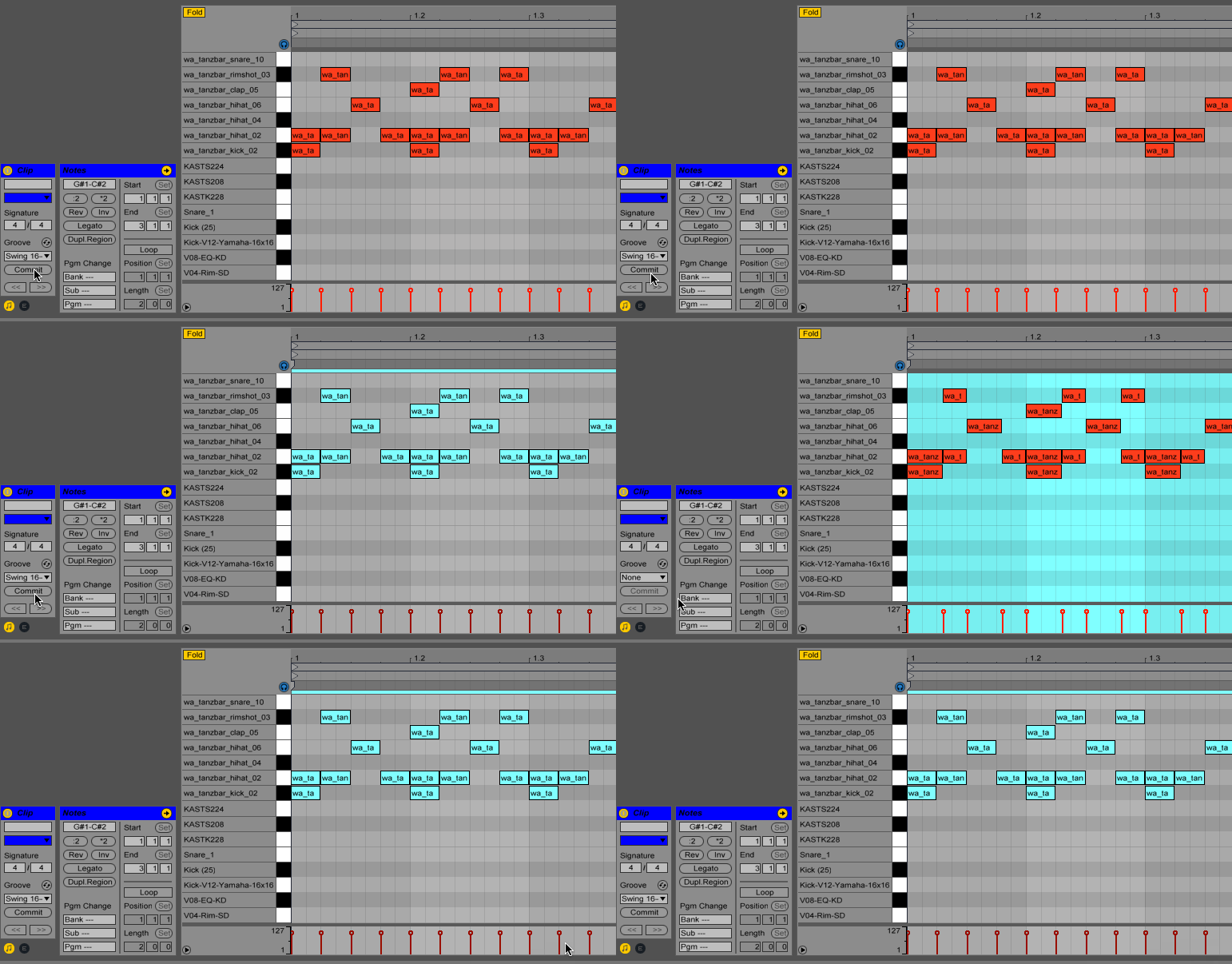
Shuffle shifts individual steps earlier or later — positive values delay and shorten, negative values advance and extend.
- Positive shuffle values: delay the note trigger and shorten note length
- Negative shuffle values: trigger earlier and extend note length
- Zero: play straight with no shuffle effect
This is the fundamental principle behind groove templating in step sequencers.
Shuffle Range
The range depends on your output PPQN:
min_shuffle = -(output_ppqn / 4) - 1
max_shuffle = +(output_ppqn / 4) - 1

Example with PPQN_96: -23 to +23 ticks per step
MPC60 Groove Example
#include <uClock.h>

#define TRACKS_SIZE 8

void onStepCallback(uint32_t step, uint8_t track) {
    int8_t shuffle_len = uClock.getShuffleLength(track);
    uint8_t step_len = getNoteLength(step, track);
    step_len += shuffle_len;
    // use step_len as the new note length
}

void setup() {
    // MPC60 groove signatures at 96 PPQN (24 ticks per step)
    int8_t shuffle_50[2]  = {0, 0};
    int8_t shuffle_54[2]  = {0, 2};
    int8_t shuffle_58[2]  = {0, 4};
    int8_t shuffle_62[2]  = {0, 6};
    int8_t shuffle_66[2]  = {0, 8};
    int8_t shuffle_71[2]  = {0, 10};
    int8_t shuffle_75[2]  = {0, 12};
    int8_t* templates[7]  = {shuffle_50, shuffle_54, shuffle_58,
                             shuffle_62, shuffle_66, shuffle_71, shuffle_75};

    uClock.setOutputPPQN(uClock.PPQN_96);
    uClock.setOnStep(onStepCallback, TRACKS_SIZE);

    uClock.init();

    uClock.setShuffleTemplate(templates[3], 0);  // 62% on track 0
    uClock.setShuffle(true, 0);

    uClock.start();
}
Shuffle API
void setShuffle(bool active, uint8_t track = 0);
bool isShuffled(uint8_t track = 0);
void setShuffleSize(uint8_t size, uint8_t track = 0);
void setShuffleData(uint8_t step, int8_t tick, uint8_t track = 0);
void setShuffleTemplate(int8_t* shuff, uint8_t size, uint8_t track = 0);
int8_t getShuffleLength(uint8_t track = 0);
Template size is configurable in uClock.h (default: MAX_SHUFFLE_TEMPLATE_SIZE 16).
External Sync & Phase Lock
Fine-tune synchronization with external clocks:
void setup() {
    uClock.setClockMode(uClock.EXTERNAL_CLOCK);

    // Lock phase every N quarter notes (default: 1)
    // Higher values = looser sync but more stable
    // Lower values = tighter sync but may jitter
    uClock.setPhaseLockQuartersCount(1);

    // Smooth tempo reading buffer (1-254)
    // Larger = smoother but slower lock time response
    uClock.setExtIntervalBuffer(64);
}
API Reference
Clock Control
void setTempo(float bpm);          // 1-500 BPM
float getTempo();                  // works with external sync too
void start();
void stop();
void pause();                      // toggle pause/continue
void setClockMode(ClockMode mode); // INTERNAL_CLOCK or EXTERNAL_CLOCK
ClockMode getClockMode();
Resolution Configuration
void setOutputPPQN(PPQNResolution res);  // main output resolution
void setInputPPQN(PPQNResolution res);   // expected external sync resolution

// Available: PPQN_1, 2, 4, 8, 12, 24, 48, 96, 384, 480, 960
// Note: inputPPQN must be ≤ outputPPQN
Timing Utilities
uint32_t bpmToMicroSeconds(float bpm);
uint8_t getNumberOfSeconds(uint32_t time);
uint8_t getNumberOfMinutes(uint32_t time);
uint8_t getNumberOfHours(uint32_t time);
uint8_t getNumberOfDays(uint32_t time);
uint32_t getNowTimer();
uint32_t getPlayTime();
Software Timer Mode
For unsupported boards or to avoid interrupt conflicts, uClock can run in software mode.
Automatic fallback: activates automatically on unsupported boards.
Manual activation: define the USE_UCLOCK_SOFTWARE_TIMER build flag.
void loop() {
    uClock.run();  // REQUIRED in software timer mode
    // your code...
    uClock.run();
}
Software timer mode provides less accurate timing than hardware interrupts. Call uClock.run() frequently for best accuracy.
Concurrency Safety
uClock operates at interrupt or thread level, meaning callbacks run detached from your main loop(). Any data accessed both inside callbacks and in loop() is a shared resource and must be protected.
The ATOMIC Macro
Use ATOMIC() when modifying shared variables from loop():
void onStepCallback(uint32_t step) {
    if (!sequencer.mute) {
        playNote();
    }
}

void loop() {
    if (buttonPressed()) {
        ATOMIC(
            sequencer.mute = readButton();
        )
    }
}
When to Use ATOMIC
MUST use ATOMIC:
- Modifying variables in
loop()that are read inside uClock callbacks - Updating multiple related variables that must change atomically
DON'T need ATOMIC:
- Inside any uClock callback
- When using uClock's built-in methods (
setTempo(),start(),stop(),setShuffle(), etc.) — these are already thread-safe
Common Pitfall
// ❌ WRONG — race condition
void onStepCallback(uint32_t step) { stepCount++; }
void loop() {
    if (stepCount >= 16) {
        stepCount = 0;  // DANGER — modified outside ATOMIC
    }
}

// ✅ CORRECT — atomic access
volatile uint8_t stepCount = 0;
void loop() {
    uint8_t currentCount;
    ATOMIC(currentCount = stepCount;)
    if (currentCount >= 16) {
        ATOMIC(stepCount = 0;)
        doSomething();
    }
}
Keep atomic sections as short as possible to minimize interrupt latency.
Migration Guide (v1.x → v2.3)
Breaking Changes
| Old API (v1.x) | New API (v2.3+) |
|---|---|
setClock96PPQNOutput() | setOnOutputPPQN() |
setClock16PPQNOutput() | setOnStep() |
setOnClockStartOutput() | setOnClockStart() |
setOnClockStopOutput() | setOnClockStop() |
setOnSync24() | setOnSync(uClock.PPQN_24, callback) |
setOnSync48() | setOnSync(uClock.PPQN_48, callback) |
setOnSyncXX() | setOnSync(uClock.PPQN_XX, callback) |
Resolution Changes
v2.0 introduces flexible PPQN configuration:
// Old (implicit 96 PPQN)
uClock.setClock96PPQNOutput(callback);

// New (explicit)
uClock.setOutputPPQN(uClock.PPQN_96);
uClock.setOnOutputPPQN(callback);
If you used setClock16PPQNOutput(), replace with setOnStep() — no other changes needed.
Examples
Complete examples in the examples directory:
| Example | Description |
|---|---|
| BasicClock | Simple internal clock setup |
| ExternalSync | Slave to external clock |
| MidiClockSync | Full MIDI sync box implementation |
| AcidStepSequencer | TB-303 style sequencer engine |
| MultiTrackSequencer | Independent track sequencing with shuffle |
License
MIT License — Copyright (c) 2025 Romulo Silva
Support
- GitHub Repository
- Report bugs via GitHub Issues
- Contact: contact@midilab.co