JC-303
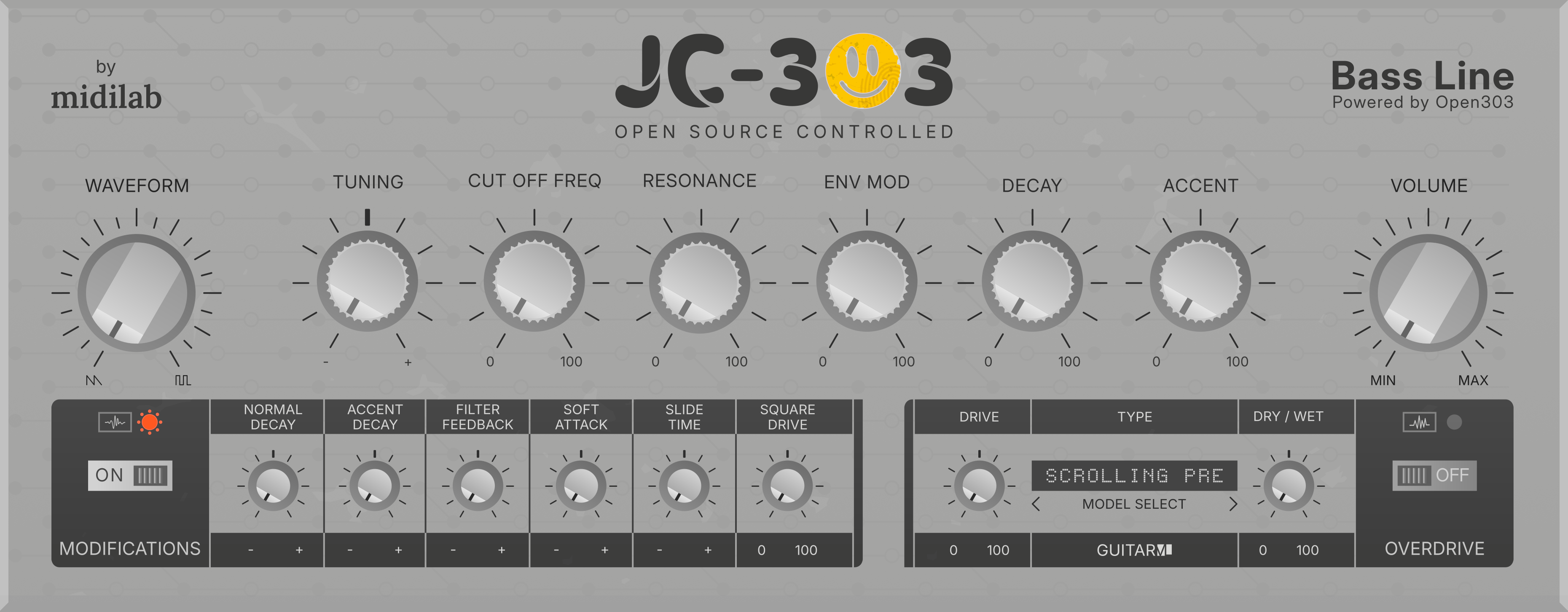
Unlock the iconic sound of Roland's TB-303 with JC-303, a faithful emulation of the legendary acid house and techno synth, available free of charge as a VST2, VST3, LV2, CLAP, and AU plugin for Linux, macOS, or Windows DAWs.
Key Features
- Authentic TB-303 sound engine — based on Open303, over 15 years of community reverse engineering and development
- AI Overdrive section — GuitarML-driven pedal and cabinet emulations using machine learning models
- Devilfish-inspired mods — select parameters from Robin Whittle's legendary 1993 modification
- Open-source — all DSP and GUI source code freely available under GPLv3
- Cross-platform — Windows, macOS, and Linux
- Plugin versatility — VST2, VST3, LV2, CLAP, and Audio Unit formats
Download
Visit JC-303 Download Page to grab yours.
Installation
Each platform ZIP contains folders per plugin format. Copy the desired format(s) to your system's standard plugin directory.
Windows
| Format | Default Path |
|---|---|
| VST2 (.dll) | C:\Program Files\VSTPlugins or C:\Program Files\Steinberg\VSTPlugins |
| VST3 (.vst3) | C:\Program Files\Common Files\VST3 |
| CLAP (.clap) | C:\Program Files\Common Files\CLAP |
| LV2 (.lv2) | %APPDATA%\LV2 or C:\Program Files\Common Files\LV2 |
macOS
| Format | Default Path |
|---|---|
| Audio Unit (.component) | /Library/Audio/Plug-Ins/Components |
| VST2 (.vst) | /Library/Audio/Plug-Ins/VST |
| VST3 (.vst3) | /Library/Audio/Plug-Ins/VST3 |
| CLAP (.clap) | /Library/Audio/Plug-Ins/CLAP |
| LV2 (.lv2) | /Library/Audio/Plug-Ins/LV2 |
macOS De-Quarantine
macOS Gatekeeper blocks unsigned plugins. De-quarantine after copying:
# Audio Unit
sudo xattr -rd com.apple.quarantine /Library/Audio/Plug-Ins/Components/JC303.component

# VST3
sudo xattr -rd com.apple.quarantine /Library/Audio/Plug-Ins/VST3/JC303.vst3

# VST2
sudo xattr -rd com.apple.quarantine /Library/Audio/Plug-Ins/VST/JC303.vst

# CLAP
sudo xattr -rd com.apple.quarantine /Library/Audio/Plug-Ins/CLAP/JC303.clap

# LV2
sudo xattr -rd com.apple.quarantine /Library/Audio/Plug-Ins/LV2/JC303.lv2
Linux
| Format | Default Path |
|---|---|
| VST2 (.so) | ~/.vst, /usr/lib/vst |
| VST3 (.vst3) | ~/.vst3, /usr/lib/vst3 |
| LV2 (.lv2) | ~/.lv2, /usr/lib/lv2 |
| CLAP (.clap) | ~/.clap, /usr/lib/clap |
After copying, rescan plugins in your DAW.
Sound Engine
The JC-303 synthesis core is based on Open303, an open-source digital emulation of the TB-303 that began in 2009 when Robin Schmidt posted a call for collaborators on the KVR Audio forum.
Over 15 years, a community of TB-303 enthusiasts dove into oscilloscope measurements, circuit reverse engineering, and deep analysis of the original hardware's quirks and character. The result is one of the most accurate open-source TB-303 emulations available.
Step Sequencer
JC303 ships with a full acid step sequencer ported from Aciduino V2. It is a 16-step monophonic sequencer clocked sample-accurately from the audio thread, playing the built-in 303 engine and sending MIDI out to the host. Note length is the authentic 303 half-step (50%) gate, and slide/tie bridge correctly from the last step back to the first. The sequencer panel and manual below target the midilabv2 GUI theme.
Layout
Each of the 16 steps is a column of controls:
| Row | Control | Meaning |
|---|---|---|
step | LED | Selects the step to edit; also shows the playing step and the active pattern length |
rest | toggle | Note ON (toggle up) or rest (toggle down) |
accent | micro-toggle | Step plays with accent |
slide | micro-toggle | Step slides into the next one |
tie | micro-toggle | Step ties into the previous note |
Below the grid are the transport buttons (PLAY/STOP, REC, REST, CLEAR, gen), the generative mod knobs, and the on-screen octave keyboard.
Editing steps
- Left-click a step LED to select the step to edit. The selected step blinks; the step currently playing is highlighted. Clicking a step at or beyond the active pattern length snaps the selection to the last active step.
- Note/rest toggle: each step is a note by default; toggle it off to make it a rest, on to re-activate it.
- Accent / Slide / Tie are per-step toggles. A tie carries the previous note over, and handles wrap-around from the last step to the first.
- The keyboard always shows the note of the selected step.
Setting the pattern length
- Right-click any step LED to set the pattern length from 1 to 16 (the clicked step becomes the last step of the pattern). Steps beyond the length are kept but stay silent.
- Length can also be set with the
Lengthitem in theSEQmenu page.
Seq keyboard
- Click a key to set the note of the selected step.
- Mouse wheel over the keyboard transposes the note of the selected step by one octave per notch (the octave of the keyboard follows the note).
- In record mode the rec cursor is the target for both actions.
Record mode
Turn REC on to enter serial (step-by-step) entry. The record cursor starts at the currently selected step and advances one step per entered event, wrapping at the pattern length.
- Keyboard: press a key to record its note and advance. Existing accent/slide/tie flags on the step are kept.
- External MIDI: velocity 100 or above records the step with accent; striking a second note while one is still held records a slide (legato); tapping the sustain pedal (CC64, 127 on) records a rest.
RESTbutton: in record mode it records a rest and advances the cursor; outside record mode it turns the selected step into a rest and moves the selection to the next step.CLEARbutton resets the whole track to rests (all accents, slides and ties removed).
Generative
The gen button generates a random pattern across all 16 steps using:
| Knob | Range (default) | Meaning |
|---|---|---|
FILL | 0–100 (80) | % chance each step is ON (not a rest) |
ACC | 0–100 (50) | % chance of accent on an ON step |
SLIDE | 0–100 (30) | % chance of slide on an ON step |
TIE | 0–100 (100) | % chance of tie on a rest step |
TONES | 1–12 (4) | Number of pitch classes to snap to (1 = single note) |
LOW | 0–127 (20) | Lowest MIDI note in the random pitch range |
RANGE | 0–127 (48) | Range above LOW of the random pitches |
The sequencer is briefly muted while a pattern is generated so no stray notes play. Generating keeps the pattern length intact but overwrites the steps within it.
Transport and clock
PLAY/STOPstarts and stops the sequencer.- The
SEQmenu page in the LCD exposes:- Length — pattern length (1–16).
- Tempo — internal BPM (20–300); active only in
Internalsync mode. - Sync Mode —
Internal(free-running at Tempo),Host(follows the DAW transport position and tempo), orMidi Clock(follows external MIDI Start/Stop/Clock messages). - Start Mode —
Transport(starts on host transport or MIDI Start) orNote Trigger(starts automatically on the first incoming note, even while stopped).
AI Overdrive Section
JC-303 integrates GuitarML technology, which uses machine learning to capture the sound of real overdrive pedals and guitar cabinets. The trained models recreate the response of actual analog hardware in real time.
- Community-driven project with a growing library of models
- Sheer unlimited tonal possibilities beyond the original TB-303
Devilfish-Inspired Mods
Created by Robin Whittle in 1993, the Devil Fish modification is one of the most sought-after third-party modifications of the original TB-303. JC-303 brings select Devil Fish parameters into the plugin, expanding the sonic palette beyond the stock 303 architecture.
Plugin Formats
| Format | Windows | macOS | Linux |
|---|---|---|---|
| VST2 | ✅ (self-build) | ✅ (self-build) | ✅ (self-build) |
| VST3 | ✅ | ✅ | ✅ |
| LV2 | ✅ | ✅ | ✅ |
| CLAP | ✅ | ✅ | ✅ |
| Audio Unit | — | ✅ | — |
VST2 binaries require a Steinberg VST2 SDK license and must be compiled from source.
Building from Source
JC-303 uses CMake and JUCE. Clone the repository and generate build files for your platform.
Dependencies
Ubuntu / Debian:
sudo apt install build-essential gcc cmake libx11-dev libxrandr-dev libxinerama-dev libxcursor-dev libfreetype6-dev libasound2-dev
macOS: Xcode command line tools
Windows: Visual Studio 2022
Generate Build Files
git clone https://github.com/midilab/jc303.git
cd jc303
macOS (Universal binary):
cmake -B build -G Xcode -D CMAKE_OSX_ARCHITECTURES="arm64;x86_64" -D CMAKE_OSX_DEPLOYMENT_TARGET=10.13
Windows:
cmake -B build -G "Visual Studio 17" -A x64
Linux:
cmake -B build
Compile
cmake --build build --config Release
GUI Themes
Choose a theme at CMake configuration time:
cmake -B build -D GUI=midilab
Available themes: amadeusp (default), midilab
VST2
Copy the vstsdk2.4/ folder to the project root before running CMake to enable VST2 builds.
Roadmap
- ✅ Binary releases for macOS, Windows, Linux
- ✅ Graphical user interface
- ✅ Internal engine tuning parameters (Devilfish inspired)
- ✅ Overdrive section
- ✅ Step sequencer
- 🔄 Step Sequencer Patterns
- 🔄 Preset support
Community
JC-303 is a community-driven project open to contributions in coding, testing, bug reporting, design, and ideas.
License
JC-303 is released under the GNU General Public License v3. The Open303 engine portion is additionally licensed under the MIT License.
Roland and TB-303 are registered trademarks of Roland Corporation. JC-303 is not affiliated with or endorsed by Roland Corporation.